Get Microsoft Office 365 apps, plus Microsoft 365 for Education Apps and Digital Learning Tools plus Classes, Field Trips, and More
Home-schooler.com is the only place where you and your home-school students can enjoy all of these resources. September 1, 2026 price increase
August 7, 2025: Eight free webinars (including Microsoft 365 for Education apps, Minecraft Education, Drones, College Prep)
Price Increase Coming September 1, 2026 - $195
Includes 1 Teacher Account + Up To 5 Student Home-Schooler.com Accounts (add-on accounts available), plus:
Download Microsoft Office Apps on up to 5 Devices (Similar to Microsoft 365 Family – $129 value)
Microsoft 365 for Education Apps (Teacher plus Students)
Includes Outlook, Teams, OneDrive and More (Complete List Below)
Digital Learning Tools
Virtual Field Trips
Beginning our 7th year! Check out these free webinars we hosted last year on August 7, 2025:

This was the free webinar on College Test Prep, which we presented on August 7, 2025. Our good friend, Jean Burke, of College Prep Genius shared the most current information about the ACT, CLT and SAT college acceptance tests.
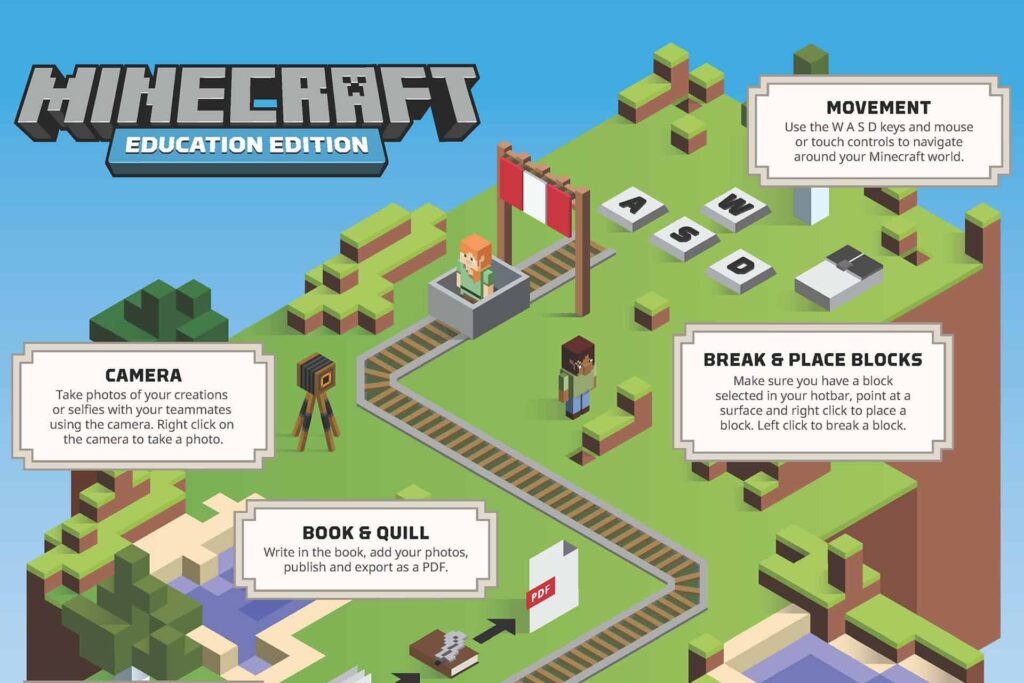
Liven up learning for your home-school students with Minecraft Education. Watch this video by one of the most prominent Minecraft education trainers in the United States.

This was the free webinar on helping home-schoolers find College Scholarships. Jean Burk, of College Prep Genius, shared many great ideas. She home-schooled her two sons and got free rides for them for college, and also savings on a law school degree.

A former Technical Writer at Microsoft takes us through a very quick run through on just a few of the Microsoft 365 for Education apps and how you can use them in your everyday home-school. You and your students can get Microsoft 365 for Education Office apps for free as part of Home-Schooler.com membership.
Microsoft Applications Included With Home-Schooler Teacher and Students Account . . .
Microsoft Applications – Defined
Application
Platform *
Description
Calendar
MS365 Education
Helps manage academic schedules by tracking deadlines, exams, and class sessions to keep learning organized.
Class Notebook
MS365 Education
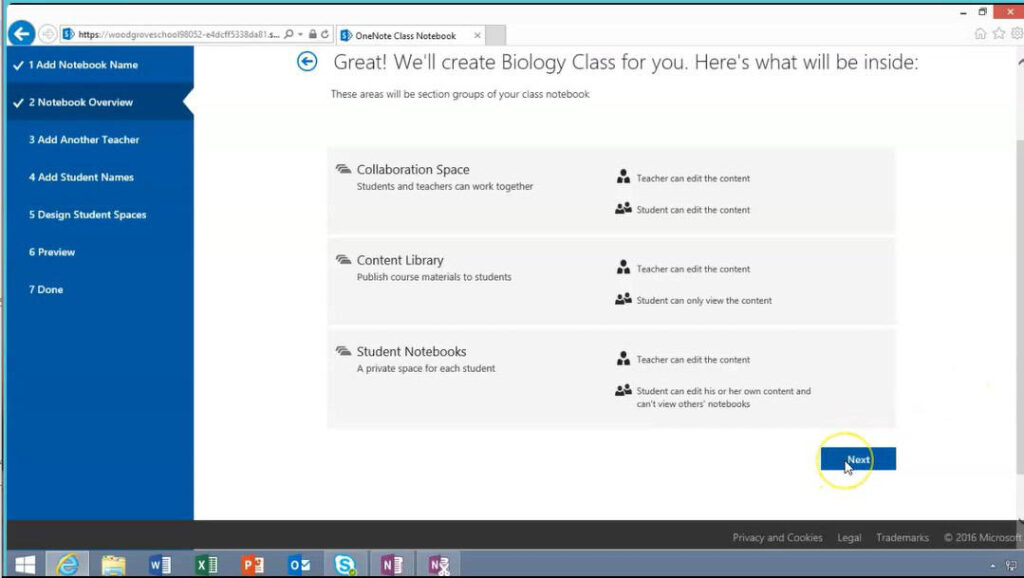
A specialized OneNote workspace where the homeschool teacher shares lessons and students complete private assignments with real‑time progress monitoring. Great for co-ops, too.
Excel
MS365 Education & Office 365
Allows the homeschool teacher to organize complex data into visual charts and spreadsheets for math and science lessons. Students develop analytical skills by performing calculations and tracking classroom experiment results. Visit our Excel page.
Immersive Reader
MS365 Education & Office 365
Enhances comprehension with customizable text display and read‑aloud features, supporting diverse learning needs. Visit our Immersive Reader page.
Math Progress
MS365 Education
Allows the homeschool teacher to assign math practice and track how students solve problems to identify procedural gaps. View our Math Progress page. Great for co-ops, too.
Microsoft 365 Copilot Chat
MS365 Education & Office 365
AI assistant for brainstorming, summarizing readings, drafting lessons or projects, and deep learning review. Acts as a 24/7 learning support tool.
Microsoft Forms
MS365 Education
Enables the homeschool teacher to create digital quizzes and surveys for real‑time understanding checks. Provides immediate feedback so instructors can adjust teaching pace. Great for co-ops, too.
Microsoft OneDrive
MS365 Education & Office 365
A secure cloud storage platform that enables homeschool Teacher and Students to access, store, and share files from any device. Automatic real‑time saving and syncing prevents lost work and support seamless collaboration. Up to 100Gb.
Microsoft OneNote
MS365 Education
A digital binder where homeschool students type notes, sketch diagrams, and organize research. The homeschool teacher distributes content and provides handwritten feedback. View our OneNote page. Great for co-ops, too,
Microsoft Teams
MS365 Education & Office 365
The digital classroom hub for posting assignments, leading discussions, and managing communication in one organized location. View our Teams page. Great for co-ops, too.
Minecraft Education (Optional)
MS365 Education
Uses a game‑based environment to teach subjects like coding, history, and chemistry through immersive 3D exploration and challenges. Includes both Teacher and one Student access. Additional student accounts may be added. View our Minecraft for Education page.
Outlook
MS365 Education & Office 365
The primary formal homeschool communication channel for lesson updates, student support, and coordination. Promotes digital citizenship. View our Outlook page.
PowerPoint
MS365 Education & Office 365
A visual storytelling tool the homeschool teacher uses for lessons using slides, images, videos, and key talking points. Also supports homeschool student presentations. View our PowerPoint page.
Reading Coach
MS365 Education
Provides personalized reading practice by identifying difficult words and offering targeted exercises to improve fluency. Microsoft partnered with reading fluency experts such as Dr. Tim Rasinski, Pam Allyn, Dr. Mark Seidenberg, and Dr. Timothy Shanahan to develop Reading Progress and Reading Coach. View our Reading Coach page.
Reading Progress
MS365 Education
Reading Progress tracks a homeschool student‘s fluency and accuracy. Reading Progress has been awarded a research-based design certification for Digital Promise. View our Reading Progress page.
Search Coach / Search Progress
MS365 Education
Teaches effective search skills and allows the homeschool teacher to see students’ research paths, building information literacy.
Speaker Coach
MS365 Education
This A.I. tool gives private, real‑time feedback to the homeschool student on presentation pace, pitch, and filler words to build confidence and speaking skills.
Translator
MS365 Education
Provides real‑time translation and captioning for lectures and discussions to support multilingual participation.
Voice Typing (Dictate)
MS365 Education
Converts spoken words into digital text in apps like Word and PowerPoint, helping homeschool students focus on ideas instead of typing.
Voice Typing (Transcribe)
MS365 Education
Records conversations or lectures and generates searchable transcripts with timestamps and speaker labels.
Word
MS365 Education & Office 365
Supports writing and literacy through essays and structured documents with built‑in editing tools for grammar and formatting.
* Platform
MS365 for Education means an application that is run from Microsoft’s cloud servers.
Office 365 means an application that is downloaded and run from your local device.
Oh, The Things We Have Heard
I was looking into ways to get the Microsoft Office 365 for Education programs without having to pay hundreds of dollars. My oldest will be writing lots of papers come the fall. We have been using Google Docs but we want him to get used to using Word and all of the other Microsoft programs.
J.O.
Home-schooler.com Member and Home-school mom
Thank you for the virtual field trip opportunity to the home-schoolers in your community. Your students asked great questions about Suzanna Bowling, and how she helped save Gen. Washington and the war. I look forward to speaking again.
Libby Carty McNamee
Author, “The Girl Who Won the Revolutionary War”
We have an enrichment program with 7 teachers teaching a total of 9 subjects to 19 students. Being able to use the suite of apps in Microsoft 365 for Education has made all the difference in our day. The lessons and virtual field trips you offer are icing on the cake.
Sara R.
Home-schooler.com Member and Enrichment Leader
Thank you for the virtual field trip with the members of the Cherokee Nation. The kids (and I) learned way more than we expected. And the handouts they provided were copied and used by 14 other students in our homeschool co-op. My kids enjoyed being the “experts”!
Tabitha
Home-schooler.com Member and Home-school mom
The Microsoft presentation you shared on Orcas was very engaging. I know it is rated for students ages 11-14 years old but our 10-year-old had no problem staying engaged. The handouts and instructions that Microsoft provided were helpful and easy to follow. This free, self-paced learning lesson was exactly what I needed.
Meghan R.
Home-schooler.com Member and Home-school mom (Australia)
I get that the Immersive Reader digital learning tool was developed by Microsoft for those with learning disabilities but seriously every student should be using this. My kids would use only this and Reading Coach if I let them. We even use it for Spanish lessons, just like you suggested.
Karla K.
Home-schooler.com Member and Home-school mom
We found Home-Schooler.com after looking around for options to get Minecraft for Education. Our pre-schooler is a huge Minecraft fan and we wanted to see if there’s a way we could shift his focus from mobs into educational challenges.
Nick R.
Home-schooler.com Member and Home-school dad
Another home schooler mom told me about you. I can’t believe every home schooler isn’t telling everyone. I am! Our daughter struggled with Microsoft 365 for Education as a college freshman, having used Google in our home school. You make it affordable for our high school sophomore son to become proficient in these wonderful apps now.
Rhonda P.
Home-schooler.com Member and Home-school mom
Microsoft 365 For Education Apps
Your Teacher and Student accounts include Microsoft’s cloud-based Microsoft 365 for Education apps. A few of which are listed below.
You may separately purchase a Microsoft Download License which allows you to download the apps and run them locally on up to 5 devices.
You may also separately purchase a Minecraft 365 for Education license for your home-school.
Today: Students can use the Microsoft Apps anytime, from anywhere, to get work done quickly, easily and in a more compelling way.
Tomorrow: These same Apps await them in college and business life. They will be ready.






Classes and Resources (examples)
Using Immersive Reader for Home-schoolers
Below is an Exercise video from our online premium course for home-schoolers: Microsoft 365 for Education – Using Microsoft Word. Specifically, this course video shows how to customize and use Microsoft’s Immersive Reader tool within Microsoft Word.
[Note: Most resources are included as part of your membership, unless otherwise noted, such as this Premium Course.]

New in Microsoft Teams for Education
Now available to home-schoolers via your free Microsoft 365 for Education subscription as a Home-Schooler.com member, Microsoft Education introduces Speaker Progress.
This is an AI-enhanced learning tool that helps improve communication and presentation skills for home-school students – just like that found in public schools.
Speaker Progress uses technology from the Speaker Coach tool. It adds AI to give personalized feedback to students’ presentations, while letting the home-school educator track progress over time.
It now supports seven foreign languages which can be used either by native speakers or home-schoolers who are studying these other languages.
Watch the 13-minute introduction video by Mike Tholfsen (Principal Group Product Manager – Microsoft Education),


The lessons above are examples of resources available at no charge with your membership.
Class Notebook and Reading Coach
An Organizational App and A Learning App
These two apps are useful to any home-schooler and are part of the Microsoft Office 365 for Education subscription, free with your Home-Schooler.com membership. [Special Offer]
OneNote Class Notebook helps organize the school learning tasks and provides individual motivation for the student. Watch the 10-minute highlight video, produced by Microsoft, to see how it is being used today. This could be especially helpful in group learning settings, such as Co-ops and Enrichment Programs. Learn more.
Reading Coach is part of Microsoft’s Learning Accelerators suite. This tool, developed after much research and development, can provide individual learning, which has been shown to produce great results. The addition of gamification principles (rewards, badges, levels) keep Readers engaged. Learn more.
Individual Teacher Account or Student(s) Account
Included With Home-Schooler Teacher and Students Account
Microsoft 365 For Education Apps
Your Teacher and Student accounts include Microsoft’s cloud-based Office 365 apps.
You may separately purchase a Microsoft Download License which allows you to download the apps and run them locally on up to 5 devices.
You may also separately purchase a Minecraft 365 for Education license for your home-school.
The #1 electronic spreadsheet used in the world. Home-schoolers can use it for Math, Science, College Prep, Data Organization, Presentations and more.
Make writing papers for your student eaay and expand their creativity with Microsoft Word, the most popular word processor in the world! Take the pain out of writing.
Easily create surveys and quizzes, and reinforce learning. with Microsoft Forms. Save time with grading results, feedback and insights.
Transform your teaching with Microsoft Notebook! Organize your lesson plans in a digital notebook, and create a workplace for your home-school students to use.
Faucibus suscipit feugiat porta mauris primis tortor ante in volutpat tristique dignissim cursus consequat
Faucibus suscipit feugiat porta mauris primis tortor ante in volutpat tristique dignissim cursus consequat
Faucibus suscipit feugiat porta mauris primis tortor ante in volutpat tristique dignissim cursus consequat
Faucibus suscipit feugiat porta mauris primis tortor ante in volutpat tristique dignissim cursus consequat