Build Reading Fluency With Reading Coach
As a home-school mom you already wear a bunch of hats hats – teacher, curriculum designer, librarian, guidance counselor, lunch lady. Wouldn’t it be nice to give your students a tool they can use on their own to assist with reading fluency that meets them where they are and gently coaches them forward – even when you’re busy? That tool exists, it’s called Reading Coach, and it’s part of Microsoft 365 for Education — which you can access completely free as a Home-schooler.com member. Not a member yet? Join Homeschooler.com now through the Special Limited Time Offer and put the full power of Microsoft 365 for Education apps to work for your home-school, all at no additional cost.
Now, let’s talk about why Reading Coach might just become the new favorite helper for you and your home-school students.
Reading Coach provides personalized, engaging, consistent and moderated reading fluency practice. It uses artificial intelligence to personalize reading content and detect fluency, while ensuring a safe and trusted experience.
It uses artificial intelligence to personalize reading content and detect fluency, while ensuring a safe and trusted experience.
Reading Coach provides free, AI -powered reading fluency practice in 81 languages – perfect for native and second language reading – offering feedback and progress tracking.
Personalized
Learners co-create their own stories with responsible AI, keeping even reluctant readers engaged.
Targeted practice
Reading Coach detects learners’ challenging words and automatically embeds opportunities for additional, independent practice.
Inclusive by design
Emerging readers and learners with dyslexia can build confidence with built-in support from Immersive Reader.
After completing a Reading Progress assignment, a student can use Reading Coach to practice the words they struggled with, improving fluency independently.
Key Features include:
- Personalized reading practice based on errors identified in Reading Progress.
- Provides real-time feedback on pronunciation and fluency.
- Highlights challenging words and allows students to practice them repeatedly.
- Uses AI to support self-paced improvement.
- Encourages confidence-building through repetition and support.
Now, let’s talk about why Reading Coach might just become the new favorite reading helper for you and your home-school students.
WHO Is Reading Coach For?
Reading Coach is for your learner – whether that’s a young reader just starting to build fluency in their native language, a confident reader who needs a little extra push on tricky words, or a teen who’s tackling a new language for the first time. It’s also for you, the home-school teacher, and any family member who’s part of your child’s learning journey. Reading Coach was designed so that learners, educators, and family members can all participate in the experience. And because home-schoolers are natural self-starters, your child can use Reading Coach independently, practicing at their own pace, on their own schedule, and on any device they have handy.
WHAT Is Reading Coach?
Reading Coach is a free AI-powered tool from Microsoft that provides personalized, independent reading fluency practice. Think of it as a patient, encouraging tutor who never gets tired, never loses their place, and always knows exactly which words your child needs to work on next.
It’s built on the foundation of Reading Progress, one of Microsoft’s Learning Accelerators, but it extends that experience beyond Microsoft Teams so your learner can practice anytime, anywhere. At its core, Reading Coach uses artificial intelligence in a safe, responsible way to create personalized stories based on words your child finds challenging, monitor how your learner reads out loud and provide real-time feedback, analyze reading for valid fluency measures like speed and accuracy, detect challenging words and offer targeted practice on those specific words, encourage healthy reading habits that stick, and even support multilingual stories and practice sessions. And the whole experience is powered by Immersive Reader, Microsoft’s fully accessible digital reading tool that makes reading comfortable for readers of all abilities – including learners with dyslexia, visual differences, or attention challenges.
WHY Should Your Home-schooler Use Reading Coach?
Practicing reading can be tedious. It can be especially hard when a child already struggles with it. There might be tears. There might be avoidance. There might be that heavy sigh you know all too well. But reading practice has to be consistent to produce real results – and for best results, it should be supported by a caring adult who’s invested in the learner’s growth and excited to witness their progress. That’s you. But you can’t always be right there, and that’s okay.
Reading Coach creates a safe, supportive, and confidence-building digital environment where your child can practice without fear of judgment. It personalizes the content around the exact words they struggle with, so practice is always targeted and never wasted time. And because the stories are magical, interesting, and adaptive, learners actually want to come back. That’s the secret sauce – Reading Coach doesn’t just build fluency, it fosters a genuine love of reading.
WHEN Can Your Learner Use Reading Coach?
Anytime. Literally anytime, and on any device. That’s one of the most beautiful things about Reading Coach for the home-school lifestyle. Morning reading block? Perfect. Quiet afternoon practice while you’re working with another child? Absolutely. Weekend catch-up on the couch? Go for it. There’s no classroom schedule required. Just your child, their device, and a personalized reading experience waiting for them.
And because Reading Coach saves progress automatically, your learner can pick up right where they left off. The most recent in-progress reading appears right on the home page, so there’s zero friction getting back into the flow.
HOW Does Reading Coach Work?
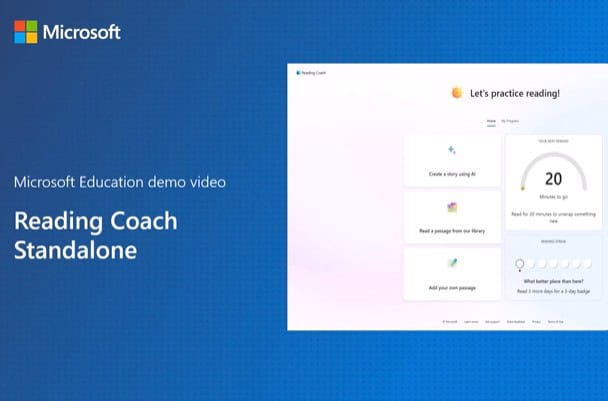
This is where it gets really fun. Reading Coach gives your learner three ways to choose what they read.
Create a Story Using AI. Your child can use AI to generate a brand-new, personalized story – one that weaves in the very words they’ve been finding challenging. This innovative blend of AI and expert-guided best practices turns practice into something that feels less like homework and more like an adventure.
Read a Passage From the Library. Microsoft provides a library of over 100 curated, Lexile-leveled passages from ReadWorks. These are high-quality, age-appropriate readings your learner can dive into at the level that’s right for them.
Add Your Own Content. This one is gold for home-school families. You, as the teacher-parent, can add your own passages – maybe something from your current curriculum, a favorite poem, or a chapter from a book you’re reading together. Your learner can also add their own content. It’s completely flexible.
Once your child has chosen their reading, they read aloud while Reading Coach listens, tracks, and coaches. Challenging words are flagged, targeted practice is generated, and fluency measures like speed and accuracy are analyzed – all behind the scenes, all without pressure.
Tracking Progress With Reading History
The History feature is more than a logbook – it’s a motivational tool. Your learner can pick up where they left off with any in-progress reading, celebrate and review completed texts, and track their growth over time. As the home-school teacher, this gives you a window into your child’s reading journey without hovering. You can see where they’ve been, how far they’ve come, and help them plan what’s next.
Going Multilingual
In our increasingly connected world, being able to read in more than one language is a gift. Reading Coach supports creating stories in 14 languages and practicing passages in over 81 languages. Whether your learner is building fluency in their native language or exploring a new one, Reading Coach makes the experience culturally and linguistically relevant – which makes it stick.
Reaping the Rewards
We all know the deep, lasting rewards of reading come from internal motivation – the ability to think critically, empathize with others, and grow into a confident lifelong learner. But let’s be real: some kids need a little external motivation to get rolling, especially if they lack confidence or just haven’t found their spark yet. Reading Coach has that covered with achievements, badges, and gamified elements that make progress feel exciting. Sometimes a digital badge is the nudge that turns “I have to read” into “I want to read.”
Your Next Step
Reading Coach is the kind of tool that makes you wonder how or why you ever home-schooled without it. This personalized, AI-powered reading tutor is patient, adaptive, always available, and completely free. Whether your child is just starting their reading journey or working to level up their fluency, Reading Coach meets them right where they are and walks alongside them.
Ready to put Reading Coach to work in your home-school? If you’re not already a Home-schooler.com member, now’s the time to join. When you do, you’ll unlock all Microsoft 365 for Education – including Reading Coach and so much more – for your entire homeschool, all at no additional cost. Join Home-schooler.com today and give your learner the reading support they deserve.
Transcript (Video Above)
Reading Coach provides free AI-powered reading fluency practice in 81 languages offering feedback and progress tracking.
Let’s create a story. We will select from the available characters and locations. The language picker allows us to choose various accents for the story narration, and the app can also recognize readers using different accents. Here, we can choose a level that is bright for us.
The AI generated story is moderated for bias and level appropriateness before being presented, meeting Microsoft’s responsible AI standards.
Comic Sans is easier for young readers, so let’s choose them.
Settings are saved across sessions. We can highlight different parts of speech or break certain words into syllables when we don’t recognize a word on the page. This option to hear the word out loud, along with the visual, is popular with younger readers. Our speech is recorded, transcribed, and analyzed for fluency.
Let’s view our results. Before we jump into the dinosaur story, let’s practice the words we got wrong. Must roll into one of the words we struggled with. Let’s hear the word read out loud. We can break it into syllables and practice ourselves when we are ready.
Learners can read from a library of English passages, educators or parents can also add their own content.
Let’s add a list of January practice words.
Reading Coach supports multiple languages.
My progress shows our metrics at the top of the page. We can also drill into a metric over a specific time period.